
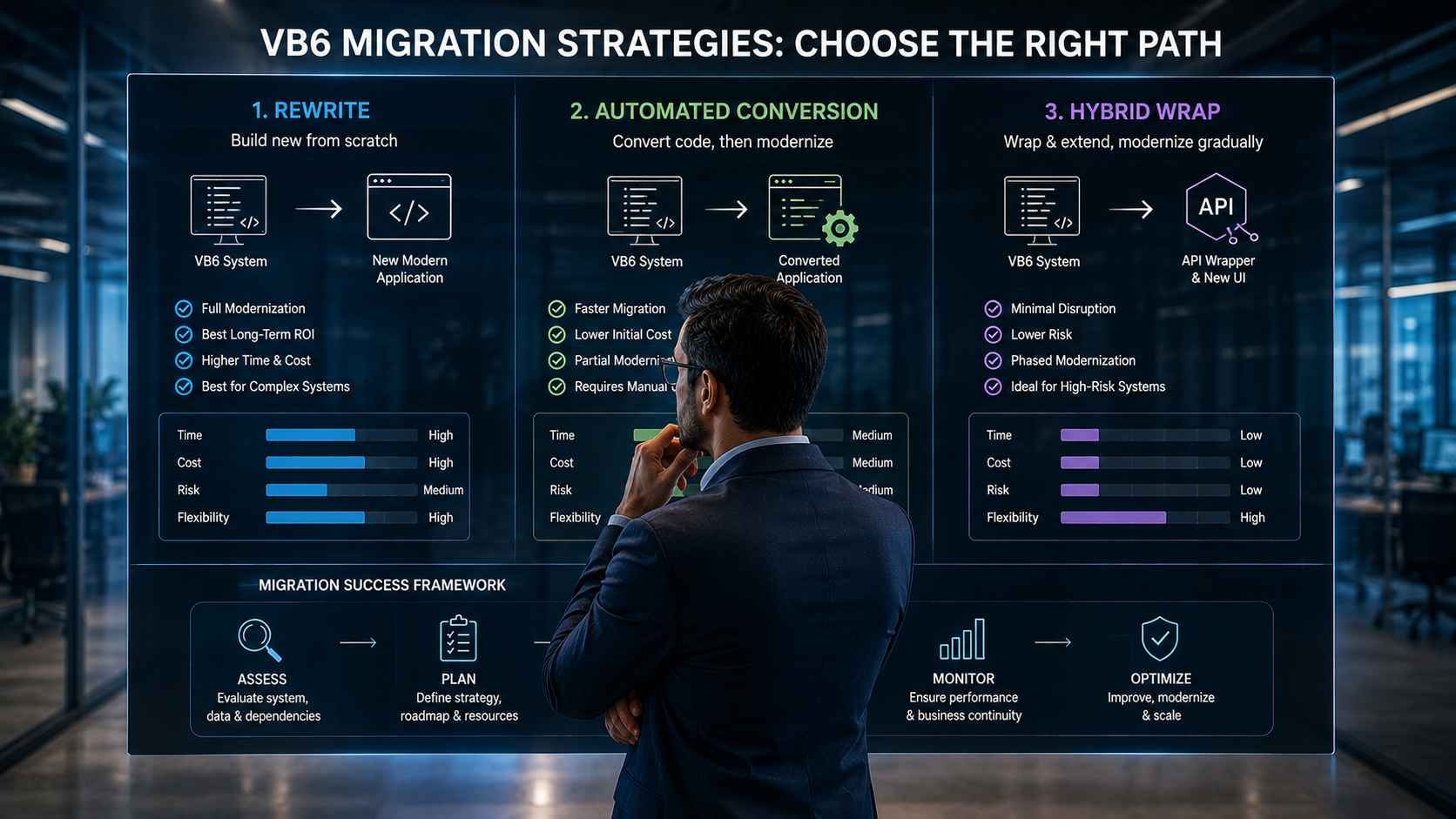
Compare three practical paths for modernizing a business-critical VB6 application and decide how much code, business logic, migration risk, and operational change your organization should take on.
A manufacturing company can run the same VB6 application for twenty years and still depend on it every morning. Quotations, engineering calculations, production orders, material rules, customer-specific pricing, or compliance logic may all live inside software that nobody wants to touch because nobody is completely certain what will break.
That is why choosing a VB6 migration strategy is not simply a question of replacing an old programming language. The real decision is how much proven business behavior you are prepared to replace, how much legacy structure you can safely preserve, and how quickly the organization needs access to modern capabilities.
Three migration approaches dominate that decision. A full rewrite replaces the application deliberately. Automated conversion attempts to carry a large amount of existing VB6 logic into a modern language or runtime. A hybrid approach leaves selected legacy functionality in place while APIs, services, or new interfaces gradually reduce dependence on it.
None of those strategies is automatically superior. A small departmental tool with straightforward workflows may deserve a clean rebuild. A large engineering system containing years of calculations and exceptions may make a rewrite unnecessarily dangerous. A stable application that mainly needs integration with newer systems may not need to be replaced immediately at all.
The useful question, then, is not “What is the modern way to replace VB6?” It is “Which migration path removes the most important legacy constraints without taking unnecessary business risk?”
A VB6 Migration Is a Strategy Decision Before It Is a Coding Project
VB6 migration should begin by deciding what must be preserved, what should be replaced, and what can remain temporarily. The source code is only one part of that decision. Teams also need to understand business rules, integrations, data dependencies, third-party components, user workflows, operational constraints, and the cost of getting equivalent behavior wrong.
This distinction matters because an old VB6 application can contain far more business knowledge than its interface suggests.
A screen that appears to calculate a quotation may actually apply:
- Customer-specific pricing rules.
- Product configuration constraints.
- Material allowances.
- Engineering formulas.
- Historical exceptions added for specific customers.
- Approval thresholds.
- Manufacturing feasibility checks.
Rebuilding the screen is easy compared with proving that all of those decisions still produce the same business result.
The application may be old while the business logic is still valuable
Legacy does not mean useless. Some VB6 systems survive precisely because they encode years of practical operating knowledge and still perform their core job reliably.
The modernization problem is often a combination of different constraints:
- The interface is difficult to maintain.
- New developers do not want to work in VB6.
- Integrations depend on files or direct database access.
- ActiveX or COM dependencies create deployment problems.
- Users need browser or mobile access.
- The application cannot easily expose modern APIs.
- Business continuity makes a big-bang replacement risky.
Those problems do not necessarily require the same solution.
KSoft Technologies' current legacy application modernization service explicitly includes VB6 among the legacy technologies it assesses and migrates, with discovery used to determine the appropriate migration path rather than assuming one modernization pattern fits every system.
Start with the constraint that matters most
If the primary problem is unsupported infrastructure, a full rewrite may be excessive.
If the application structure prevents every meaningful product change, preserving most of the old architecture may merely move technical debt into a newer language.
If undocumented engineering logic represents the greatest risk, the project may need to preserve and isolate that logic before replacing it.
A good VB6 modernization strategy does not maximize the amount of code replaced. It changes the parts creating business risk while protecting the behavior the business still depends on.
What Are the Three Practical VB6 Migration Strategies?
The three practical VB6 migration strategies are full rewrite, automated conversion, and hybrid wrapping. A rewrite rebuilds the application on a modern stack. Automated conversion translates as much existing code as possible before engineers remediate the result. Hybrid wrapping preserves selected VB6 functionality while modern APIs, services, or interfaces are built around it.
The difference between them is fundamentally a decision about how much existing implementation to preserve.
1. Full rewrite
A full rewrite treats the existing VB6 system primarily as a source of requirements and business behavior rather than code that must survive.
Engineers rebuild the application using a modern architecture and technology stack, potentially replacing:
- VB6 forms.
- Business modules.
- Data-access code.
- COM components.
- Reporting.
- Integration logic.
This provides the greatest architectural freedom, but it also creates the largest requirement-discovery problem because every important behavior must be identified and reproduced deliberately.
2. Automated code conversion
Automated conversion uses migration tooling to translate a substantial portion of the VB6 codebase into a modern target such as VB.NET or another .NET-compatible direction.
Automation can accelerate mechanical translation, but converted code is not automatically production-ready. Engineers still need to address unsupported controls, COM dependencies, language differences, data access, generated code quality, architecture, testing, and behavioral equivalence.
The approach is therefore better understood as conversion plus remediation, not one-click modernization.
3. Hybrid API wrapping
A hybrid strategy keeps selected VB6 functionality operational while new components are introduced around it.
The team may:
- Expose legacy functions through an API boundary.
- Build a modern web interface over existing business services.
- Move new workflows into modern services.
- Replace legacy modules incrementally.
- Integrate the VB6 application with newer ERP, CRM, cloud, or analytics platforms.
Hybrid migration is especially relevant when the business needs modernization benefits now but cannot safely replace all legacy logic in one project.
Do Not Choose a VB6 Migration Path From the Codebase Alone
Assess business logic, dependencies, operational risk, and modernization goals before committing to a rewrite, automated conversion, or hybrid approach.
Assess Your VB6 Migration OptionsWhy Does the Wrong VB6 Migration Strategy Become Expensive?
The wrong VB6 migration strategy becomes expensive when it either replaces too much proven functionality or preserves too much of the architecture causing the original problem. A rewrite can create unnecessary redevelopment and regression risk, while an overly mechanical conversion can leave the organization with modern-looking code that still carries legacy coupling and maintenance problems.
Rewriting too much creates a requirements-recovery project
A large legacy application rarely has one complete requirements document that accurately describes its current behavior.
Requirements may instead be distributed across:
- Source code.
- Database procedures.
- Configuration tables.
- User knowledge.
- Reports.
- Historical fixes.
- Integration behavior.
Choosing a rewrite means accepting responsibility for recovering those requirements before the old implementation disappears.
Converting too much can preserve the wrong architecture
Automated translation can reduce manual rewriting, but it cannot decide which twenty-year-old design choices the business should continue carrying.
If the source application has:
- Large tightly coupled forms.
- Business logic embedded in UI events.
- Global state.
- Direct database access throughout the application.
- Extensive COM dependencies.
translating those structures does not automatically produce a maintainable modern architecture.
Wrapping indefinitely can postpone the real problem
Hybrid wrapping is useful when it creates a controlled migration boundary. It becomes problematic when temporary coexistence quietly turns into permanent dependence on the same fragile legacy core.
A hybrid strategy therefore needs an explicit answer to one question:
Are we deliberately preserving this component because it remains valuable, or are we preserving it because replacing it is uncomfortable?
That distinction prevents a tactical wrapper from becoming another decade of deferred modernization.
Assess the Application Before Choosing Rewrite, Conversion, or Wrap
A VB6 migration assessment should evaluate the application at code, architecture, business, dependency, and operational levels. The goal is to identify which parts are understood, which parts are risky to reproduce, which components block modernization, and which capabilities can be separated safely.
Measure the application, not just the number of forms
Useful technical inventory may include:
- Forms and user controls.
- Modules and classes.
- Lines of code.
- ActiveX controls.
- COM components.
- Third-party libraries.
- Database access patterns.
- Reports.
- File-based interfaces.
- External integrations.
Size matters, but coupling matters more. A smaller application can still be difficult to migrate when important logic is scattered across forms, database triggers, shared modules, and external components.
Locate the business-critical logic
Manufacturing and engineering systems often contain calculations or decision rules that cannot be treated like ordinary CRUD code.
Identify logic responsible for:
- Engineering calculations.
- Product configuration.
- Quotation logic.
- Material selection.
- Production constraints.
- Compliance checks.
- Customer-specific exceptions.
The less documented and more consequential that logic is, the more cautious the team should be about replacing it wholesale.
Identify the real modernization objective
Ask what the organization actually needs from the project.
Is the priority to:
- Remove dependence on VB6 skills?
- Support modern Windows environments?
- Move users to a browser?
- Introduce mobile access?
- Connect the application to ERP or cloud services?
- Improve security?
- Simplify deployment?
- Redesign workflows?
- Replace the application completely over time?
A migration strategy should be selected against those outcomes. Otherwise the project can spend heavily modernizing code without solving the operational limitation that triggered the initiative.
Classify modules instead of forcing one strategy across the entire application
Large VB6 systems do not always need one uniform treatment.
One application may contain:
- Commodity CRUD screens suitable for conversion or rebuilding.
- High-value engineering logic worth preserving initially.
- Obsolete modules that should be retired.
- Integration functions that should move into APIs.
- Reporting components better replaced with modern reporting tools.
That module-level classification is what makes a genuinely hybrid modernization strategy possible.
When Does a Full VB6 Rewrite Make Sense?
A full VB6 rewrite makes sense when the existing application is small enough to understand completely, its workflows need substantial redesign, the current architecture blocks future requirements, and the organization can validate the replacement without depending on undocumented behavior hidden inside the legacy code.
Rewriting gives the development team the most freedom. Instead of preserving the original structure, engineers can choose a modern application architecture, redesign workflows, remove obsolete modules, introduce APIs, improve security, and build around current business requirements.
That freedom is also what makes a rewrite dangerous.
Every piece of behavior that matters must be rediscovered, documented, rebuilt, and tested.
Rewrite when the application is genuinely understandable
A rewrite is easier to justify when the business can answer basic questions confidently:
- Which workflows are still used?
- Which modules can be retired?
- Which calculations are business-critical?
- Which exceptions are intentional?
- Which integrations must remain compatible?
- Which outputs must match the existing system?
If experienced users and technical staff can describe the application's current behavior accurately, the rewrite team has a realistic foundation for rebuilding it.
The risk increases sharply when important behavior exists only inside source code that nobody fully understands.
Rewrite when the workflow itself needs to change
Automated conversion is designed to preserve existing behavior. That is useful when existing behavior is valuable.
It is less useful when the company wants to replace the workflow itself.
A full rebuild may be more appropriate when the organization wants to move from:
- Desktop-only access to browser-based workflows.
- Department-specific processing to shared cross-functional workflows.
- Manual file exchange to API-driven integration.
- Local reporting to centralized analytics.
- Fixed workstation deployment to cloud-hosted access.
In those situations, faithfully converting every old form may preserve an operating model the business is already trying to leave behind.
Rewrite when the application contains more obsolete code than valuable code
Some VB6 systems grew for years without old functionality being removed.
The application may contain:
- Screens no longer used.
- Functions tied to discontinued products.
- Old customer-specific workflows.
- Duplicate reporting logic.
- Integrations with retired systems.
Converting all of that code because it exists can increase remediation effort without creating business value.
A rewrite allows the team to modernize the required business capability rather than reproduce the entire historical application.
Rewrite when long-term architecture matters more than short-term migration speed
A full rewrite can create the cleanest long-term result because the application does not need to preserve legacy design decisions.
The tradeoff is that the organization must accept:
- Longer requirements analysis.
- More development work.
- Greater regression-testing responsibility.
- Higher risk of missing hidden business rules.
- A potentially longer period before the legacy system can be retired.
For a small, well-understood application, those costs may be reasonable. For a large calculation-heavy engineering system, they may not be.
When Is Automated VB6 Conversion the Better Option?
Automated VB6 conversion is most useful when a large portion of the existing application still represents valid business behavior, the organization wants to reduce manual rewriting, and the codebase is structured well enough that generated modern code can be remediated systematically after translation.
The attraction is straightforward: instead of rebuilding every routine manually, migration tooling handles repetitive syntax and language translation.
But automated conversion should be evaluated as an engineering accelerator, not as an automatic modernization outcome.
What automated conversion can reduce
Conversion tooling can help reduce effort associated with:
- Translating language syntax.
- Converting common control structures.
- Moving large quantities of procedural logic.
- Identifying unsupported constructs.
- Producing a starting codebase for remediation.
For a large application, eliminating thousands of repetitive manual translation decisions can materially change the economics of a migration.
What automated conversion cannot decide
A conversion tool cannot determine whether the original architecture still makes sense.
It cannot decide whether:
- A large form should become multiple services.
- Business logic should move out of UI event handlers.
- A direct database call should become a repository or API.
- A COM dependency should be replaced entirely.
- An obsolete feature should be removed.
Those are architecture and business decisions.
Conversion success depends on remediation quality
After conversion, engineers typically need to review:
- Unsupported controls.
- COM interoperability.
- Data-access libraries.
- Error handling.
- File-system assumptions.
- Windows-specific behavior.
- Generated code readability.
- Performance-sensitive routines.
Automated translation can shorten the path to a compilable modern codebase. It does not remove the need for engineering judgment after that point.
What Makes a VB6 Application a Good Candidate for Automated Conversion?
A VB6 application is a stronger automated-conversion candidate when its existing behavior should largely remain intact, the codebase has manageable dependencies, the team wants to preserve proven logic, and the main objective is moving away from the legacy runtime rather than redesigning the entire product.
Strong conversion candidates usually have stable business workflows
Conversion becomes more attractive when users are generally satisfied with what the application does.
The business may primarily need:
- A supported technology foundation.
- Easier developer recruitment.
- Better deployment.
- Improved security.
- Future integration flexibility.
In that situation, recreating every requirement through a rewrite may create more risk than preserving validated behavior.
Code organization still matters
Automated conversion is easier when:
- Business logic is separated from interface code.
- Shared modules have clear responsibilities.
- Third-party components are documented.
- Database access patterns are consistent.
- Build dependencies are known.
A highly tangled application can still be converted, but the remediation effort may become large enough that the advantage over selective rewriting begins to disappear.
Conversion is especially valuable when logic volume is high
Imagine an application containing hundreds of routines implementing engineering calculations, product configuration rules, and quotation logic.
If those routines remain valid, manually rewriting every calculation creates two jobs:
- Reimplement the logic.
- Prove the new logic produces equivalent results.
Conversion can reduce the first problem by preserving more of the original implementation, allowing the project to concentrate more effort on remediation and verification.
Warning Signs That Automated Conversion May Preserve Too Much Technical Debt
Automated conversion becomes less attractive when the application needs major architectural change, much of the functionality is obsolete, or the existing code structure is itself the main reason modernization is required. In those cases, translating the source can preserve complexity rather than remove it.
Watch for these conditions
- Business logic is heavily embedded in form events.
- Global variables control important application behavior.
- Modules share state unpredictably.
- Database access is duplicated throughout the application.
- Unsupported third-party controls appear across many screens.
- Old features represent a large percentage of the codebase.
- The business wants fundamentally different workflows.
- The target architecture is intended to be web-first or service-oriented.
None of these automatically eliminates automated conversion. They simply increase the amount of post-conversion restructuring that may be required.
Compare conversion plus cleanup against selective redevelopment
The meaningful estimate is not:
“How quickly can we convert the code?”
It is:
“How much work remains after conversion before this application is maintainable, testable, deployable, and ready for production?”
That is the number that should be compared with rewrite and hybrid alternatives.
When Should You Wrap VB6 Instead of Replacing It?
A hybrid VB6 migration is appropriate when important legacy functionality is stable but difficult or risky to replace immediately. The application remains operational while selected capabilities are exposed through APIs, moved into modern services, or replaced module by module. This reduces big-bang migration risk while creating a controlled path away from the legacy core.
Wrapping is useful when the business needs integration before replacement
A company may not need a new calculation engine immediately.
It may instead need the existing calculation engine to work with:
- A modern ERP.
- A CRM.
- A customer portal.
- A web quotation system.
- Cloud analytics.
- Mobile workflows.
In that case, an API or service boundary can make legacy capabilities available to newer applications without rewriting the entire engine first.
Wrapping can isolate high-risk business logic
Consider a mature engineering module that has produced trusted results for years but contains difficult-to-document calculations.
Replacing it immediately may add little business value while introducing substantial validation risk.
A hybrid strategy can preserve that engine temporarily while surrounding workflows move to modern components.
Later, once test coverage and business-rule documentation are stronger, the isolated legacy component can be replaced separately.
Hybrid migration works best when boundaries can be defined clearly
Good candidates for isolation include modules with:
- Defined inputs.
- Defined outputs.
- Limited shared state.
- Stable business behavior.
- High replacement risk.
Modules that depend heavily on shared UI state, global variables, or direct calls into many application components are harder to wrap cleanly.
Use Hybrid Wrapping as a Migration Path, Not an Excuse to Stop
The strongest hybrid migrations progressively reduce dependence on VB6. Each modernization phase moves a clear responsibility to the new environment until the remaining legacy surface becomes small enough to retire, replace, or intentionally retain.
Phase 1: Establish a stable boundary
Identify the legacy capability that must remain and define how newer systems will communicate with it.
Phase 2: Move new development outside VB6
New workflows should generally be built on the target architecture rather than extending the legacy application further.
Phase 3: Extract replaceable modules
Prioritize components that:
- Change frequently.
- Block integration.
- Create deployment problems.
- Carry high maintenance costs.
Phase 4: Retire the legacy core deliberately
The project should define what must happen before the remaining VB6 runtime can be removed.
Without that retirement logic, a hybrid architecture can become permanent coexistence.
Think About the Three Strategies as a Risk Spectrum
Rewrite, automated conversion, and hybrid wrapping distribute risk differently. Rewrite accepts more redevelopment risk to gain architectural freedom. Conversion preserves more existing implementation but may carry legacy design forward. Hybrid wrapping minimizes immediate replacement risk but temporarily increases coexistence and integration complexity.
| Strategy | Primary Risk | Primary Advantage | Best Fit |
|---|---|---|---|
| Full Rewrite | Missing or incorrectly rebuilding legacy behavior | Maximum architectural freedom | Smaller or well-understood applications requiring major redesign |
| Automated Conversion | Carrying legacy structure into the target codebase | Preserves more proven implementation and reduces manual translation | Large applications with valuable existing business logic |
| Hybrid Wrap | Temporary architectural coexistence becoming permanent | Reduces immediate replacement risk and enables phased modernization | Business-critical systems with modules too risky to replace at once |
The decision is therefore not about finding the strategy with no risk. Every option moves risk to a different part of the project.
The right choice puts risk where the organization can control it.
Match the Migration Method to the Risk Inside Your VB6 System
A structured assessment can separate code that should be rebuilt, code worth converting, and business-critical logic that should be isolated before replacement.
Discuss Your VB6 Modernization PlanRewrite vs. Automated Conversion vs. Hybrid Wrap
The three VB6 migration strategies solve different problems. A full rewrite maximizes architectural freedom. Automated conversion preserves more of the existing implementation. Hybrid wrapping minimizes immediate replacement risk by isolating legacy capabilities behind modern interfaces.
The right choice depends on what the organization is trying to optimize:
- Long-term architecture.
- Migration speed.
- Business-logic preservation.
- Operational risk.
- Budget.
- Availability of subject-matter experts.
- Future integration requirements.
| Decision Factor | Full Rewrite | Automated Conversion | Hybrid Wrap |
|---|---|---|---|
| Architectural Freedom | High | Moderate | Moderate initially, increasing over time |
| Preservation of Existing Logic | Low unless deliberately reimplemented | High | High for wrapped components |
| Upfront Development Effort | High | Moderate | Moderate |
| Requirements Discovery Risk | High | Lower | Lower for preserved components |
| Ability to Redesign Workflows | High | Limited unless followed by refactoring | High for newly extracted workflows |
| Legacy Technical Debt Risk | Lowest if rewrite is well designed | Highest if converted code is not refactored | Remains inside retained legacy components |
| Business Continuity Risk | Higher during replacement | Moderate | Often lower because modernization can be phased |
| Best Fit | Smaller or well-understood systems needing redesign | Large systems with valuable existing logic | Critical systems too risky to replace at once |
Choose rewrite when replacement risk is lower than preservation cost
If the application is relatively small, requirements are understood, and the business wants major workflow or architecture change, preserving the original implementation may provide little value.
Choose conversion when business logic is the asset
If the application contains a large amount of proven domain logic and the primary problem is the technology platform, conversion can reduce the amount of behavior that must be recreated manually.
Choose hybrid when timing and risk prevent immediate replacement
If the company needs new interfaces, APIs, integrations, or browser access quickly but cannot safely replace critical VB6 logic, hybrid modernization can separate urgent modernization from eventual retirement.
A Manufacturing VB6 Migration Scenario
Consider a hypothetical boiler manufacturer using a VB6 application for quotation and engineering calculations.
The system has been used for years to calculate:
- Boiler dimensions.
- Material requirements.
- Pressure-related calculations.
- Customer-specific configurations.
- Manufacturing allowances.
- Final quotation values.
The application also exports information to downstream production and finance processes.
The company wants:
- Browser access.
- Better ERP integration.
- Easier deployment.
- A modern supportable codebase.
All three strategies are technically possible, but they create very different risk profiles.
Option 1: Rewrite the entire application
The team rebuilds the quotation and calculation system using a modern web stack.
Benefits include:
- Clean architecture.
- Modern browser interface.
- Easier integration.
- No long-term VB6 dependency.
The main risk is proving that the new calculation engine reproduces every important engineering rule correctly.
If the system contains undocumented calculation exceptions accumulated over twenty years, the rewrite may become less a development project and more a business-logic reconstruction project.
Option 2: Convert the VB6 code
The team translates much of the existing calculation and application code into a modern .NET environment, then remediates unsupported controls, integrations, database access, and architectural issues.
This can preserve more of the calculation implementation.
The tradeoff is that the resulting code may still require substantial refactoring before it becomes easy to maintain.
Option 3: Preserve the calculation engine and modernize around it
The company could isolate the trusted calculation logic, expose it through a controlled service or API boundary, and build a modern web quotation interface around it.
Other components could then be replaced gradually.
This approach may allow:
- Browser access sooner.
- ERP integration sooner.
- Lower immediate risk to engineering calculations.
- Incremental replacement of legacy modules.
The tradeoff is temporary coexistence between modern and legacy components.
The decision depends on where the risk lives
If the calculation logic is fully documented and covered by strong test cases, a rewrite becomes more realistic.
If the logic is large but structurally convertible, automated conversion may reduce redevelopment.
If the logic is difficult to reproduce but the surrounding workflows urgently need modernization, hybrid wrapping may offer the safest first step.
Inventory Business Logic Before Estimating the Migration
A meaningful VB6 migration estimate requires more than counting forms, modules, or lines of code. Teams need to identify which parts of the system implement business behavior and how difficult that behavior will be to validate after modernization.
Classify business rules by criticality
A practical classification may include:
- Critical: incorrect behavior could affect safety, compliance, pricing, production, or significant financial outcomes.
- High: incorrect behavior materially disrupts operations or customer service.
- Moderate: incorrect behavior creates inconvenience but can be detected and corrected.
- Low: obsolete or low-value functionality that may not need to survive migration.
Identify where each rule lives
Business behavior may exist in:
- Form event handlers.
- Shared modules.
- COM libraries.
- Database procedures.
- Configuration tables.
- Reports.
A migration plan that examines only the VB6 project files can therefore underestimate the real modernization scope.
Identify who can validate the behavior
The source code may reveal how the application behaves, but experienced users often explain why it behaves that way.
Identify:
- Engineering subject-matter experts.
- Manufacturing users.
- Estimators.
- Finance users.
- Long-term support staff.
Their availability can materially affect which strategy is realistic.
Map VB6 Dependencies Before Selecting the Target Architecture
VB6 applications often depend on components that are separate from the source code but essential to production behavior. Dependency analysis helps determine whether the application can be converted directly, needs selective replacement, or should be isolated behind a hybrid boundary.
Inspect COM and ActiveX dependencies
Document:
- ActiveX controls.
- COM DLLs.
- OCX files.
- Third-party libraries.
- Office automation.
- Hardware interfaces.
For each dependency, determine whether a supported modern equivalent exists.
Inspect database dependencies
Look for:
- ADO or DAO access.
- Direct SQL embedded informs.
- Stored procedures.
- Database triggers.
- Shared databases used by other systems.
Inspect operating-system dependencies
Legacy applications may rely on:
- Registry entries.
- Local file paths.
- Network drives.
- Windows APIs.
- Printer integrations.
- Desktop automation.
Inspect external-system dependencies
Include:
- ERP.
- CRM.
- Manufacturing systems.
- Reporting platforms.
- File exchanges.
- External APIs.
Dependency complexity often has more influence on migration difficulty than code volume alone.
Treat the VB6 User Interface as a Separate Modernization Decision
The existing VB6 interface does not necessarily need the same migration strategy as the underlying business logic. A company may preserve proven calculation or workflow logic while replacing desktop forms with a browser-based interface.
Rebuilding the UI may deliver immediate value
A modern interface can improve:
- Remote access.
- Deployment.
- Device compatibility.
- User experience.
- Security controls.
Avoid recreating every old screen automatically
A twenty-year-old desktop workflow may contain:
- Screens built around old organizational structures.
- Repeated data entry.
- Navigation designed around technical limitations.
- Fields no longer needed.
Modernization creates an opportunity to simplify the user journey even when core business logic remains unchanged.
Decouple UI modernization from calculation replacement
Separating the interface from domain logic gives the organization more migration options.
It may allow a modern UI to be introduced while critical legacy logic continues operating behind a controlled service layer.
Build the Test Strategy Before Changing the Code
Testing is what makes any VB6 migration strategy credible. Without a reliable way to compare old and new behavior, the organization cannot prove that a rewrite, converted application, or hybrid architecture still produces the business outcomes users depend on.
Capture baseline behavior
Before migration, record:
- Representative inputs.
- Expected outputs.
- Reports.
- Integration results.
- Important error conditions.
Prioritize high-risk calculations
Create stronger test coverage around:
- Pricing.
- Engineering formulas.
- Product configuration.
- Compliance rules.
- Production calculations.
Compare systems automatically where possible
If the same input can be processed through both legacy and modern implementations, automated comparison can reveal discrepancies faster than manual testing alone.
This is particularly useful for large calculation-heavy VB6 systems.
Use Parallel Running for High-Risk VB6 Workflows
Parallel running allows the legacy and modern implementations to process the same or equivalent workloads for a controlled period. Teams can compare results before the new application becomes the only production system.
Parallel running is useful for:
- Quotations.
- Engineering calculations.
- Financial totals.
- Manufacturing outputs.
- Compliance-related processing.
Define comparison tolerances
Some outputs should match exactly.
Others may legitimately change because:
- Business rules were intentionally updated.
- Rounding was standardized.
- Obsolete logic was removed.
Every expected difference should be documented rather than treated as an unexplained exception.
Decide Whether the Database Needs Modernization Too
VB6 modernization does not automatically require an immediate database replacement. The database should be evaluated separately based on supportability, performance, schema quality, integration needs, security, and how tightly application code depends on it.
Keeping the database initially can reduce migration scope
If the existing SQL database is stable and supported, a project may modernize the application layer first.
This can reduce simultaneous change during the highest-risk phase.
Database modernization may be necessary when:
- The engine is unsupported.
- The schema prevents modern integration.
- Performance is inadequate.
- Security controls are insufficient.
- The target architecture requires a different data model.
Avoid unnecessary simultaneous transformation
Rewriting the application, redesigning the database, replacing integrations, and changing the user workflow in one release increases the number of variables that must be validated together.
Estimate VB6 Migration Effort by Remediation, Not Translation Alone
A realistic VB6 migration estimate should account for discovery, code translation or redevelopment, dependency replacement, testing, data work, deployment, integration remediation, business validation, and cutover. Estimating only the amount of source code that needs conversion can significantly understate the project.
Estimate discovery
Include time for:
- Code inventory.
- Dependency analysis.
- Business-rule discovery.
- User interviews.
- Test-case creation.
Estimate remediation
Include:
- Unsupported controls.
- COM replacement.
- Database access changes.
- Architecture refactoring.
- Integration changes.
Estimate validation
Include:
- Regression testing.
- Calculation comparison.
- UAT.
- Performance testing.
- Parallel running.
In complex legacy projects, validation can consume as much attention as implementation because business equivalence must be proven, not assumed.
The Best VB6 Strategy Is the One That Matches the Risk You Actually Have
Compare rewrite, conversion, and hybrid modernization against your business logic, dependencies, architecture, testing burden, and operational timeline.
Evaluate Your VB6 ApplicationHow Do You Choose the Right VB6 Migration Strategy?
The right VB6 migration strategy depends on five questions: how much of the existing business logic should be preserved, how much architectural change is required, how quickly modernization benefits are needed, how much migration risk the organization can tolerate, and how well the current application is understood.
Those questions are more useful than beginning with a preferred technology.
Question 1: How much business logic can you confidently reproduce?
If critical logic is well documented and covered by reliable tests, a rewrite becomes easier to justify.
If important calculations are poorly documented but proven in production, preserving or converting them may reduce business risk.
Question 2: Is the architecture or the runtime the bigger problem?
If the main problem is simply dependence on VB6 and unsupported components, automated conversion may solve much of the immediate risk.
If the application is tightly coupled, difficult to integrate, and fundamentally mismatched with future requirements, deeper redesign may be necessary.
Question 3: How urgently does the business need modern capabilities?
Hybrid migration becomes attractive when the organization needs capabilities such as:
- Browser access.
- API integration.
- Cloud connectivity.
- Mobile workflows.
- ERP integration.
but cannot safely wait for a complete replacement.
Question 4: Can the business tolerate a long replacement project?
A rewrite may deliver the cleanest end state, but it can require the longest period of parallel development and validation.
If the legacy application is already creating operational risk, waiting years for a complete replacement may not be acceptable.
Question 5: Can the system be decomposed safely?
Hybrid modernization depends on boundaries.
If modules can be separated into clear capabilities with defined inputs and outputs, the system can be modernized incrementally.
If everything shares state and directly depends on everything else, wrapping individual pieces becomes more difficult.
Use a Decision Matrix Instead of Choosing by Preference
A decision matrix helps teams compare migration strategies against the actual characteristics of the VB6 application rather than choosing a rewrite, conversion, or hybrid approach based on developer preference.
| Application Condition | Rewrite | Automated Conversion | Hybrid Wrap |
|---|---|---|---|
| Small codebase | Strong fit | Possible | Usually unnecessary |
| Large proven business-logic base | Higher risk | Strong fit | Strong fit for high-risk modules |
| Major workflow redesign required | Strong fit | Weak fit without major refactoring | Possible through phased replacement |
| Poorly documented calculations | High risk | Better preservation | Strong preservation option |
| Urgent API or web requirement | Slower initial value | Moderate | Strong fit |
| Extensive obsolete functionality | Strong fit | Can preserve unnecessary code | Useful if obsolete modules can be bypassed |
| Need for clean long-term architecture | Strongest fit | Requires significant refactoring | Achievable incrementally |
Classify VB6 Modules Before Assigning a Migration Method
Large legacy systems often benefit from a module-by-module strategy rather than one migration method for the entire application. Some modules may deserve rewriting, others conversion, and a small number of high-risk components may remain behind controlled interfaces until they can be replaced safely.
Category 1: Rewrite
Good rewrite candidates may include:
- Simple CRUD screens.
- Obsolete user interfaces.
- Modules requiring major workflow redesign.
- Components with little unique business logic.
Category 2: Convert
Good conversion candidates may include:
- Stable calculation modules.
- Large procedural business-rule libraries.
- Modules with limited unsupported dependencies.
- Code whose current behavior should remain largely unchanged.
Category 3: Wrap temporarily
Good hybrid candidates may include:
- Highly trusted engineering engines.
- Complex pricing logic.
- Difficult third-party integrations.
- Modules that would create disproportionate replacement risk.
Category 4: Retire
Some legacy code should not be migrated at all.
Retire:
- Unused modules.
- Duplicate reports.
- Old integrations.
- Functions tied to discontinued products.
Removing unnecessary scope can materially reduce migration effort.
Build the Migration Roadmap Around Risk
A strong VB6 migration roadmap does not simply move from screen one to screen two. It sequences modernization so that high-value, low-risk improvements happen early while the most difficult business logic receives the time and validation it requires.
Phase 1: Discovery and assessment
Complete:
- Source-code inventory.
- Dependency mapping.
- Business-rule discovery.
- User interviews.
- Architecture assessment.
- Test baseline creation.
Phase 2: Classify components
Assign each module to:
- Rewrite.
- Convert.
- Wrap.
- Retire.
Phase 3: Build the target foundation
Establish:
- Target architecture.
- Authentication.
- Database access strategy.
- API standards.
- Logging.
- Deployment pipeline.
Phase 4: Migrate lower-risk components first
Early components should help prove:
- Deployment.
- Integration.
- Testing.
- User adoption.
Phase 5: Migrate high-value business logic
Use stronger comparison testing and subject-matter validation for:
- Engineering calculations.
- Pricing.
- Configuration rules.
- Compliance-related logic.
Phase 6: Decommission VB6 deliberately
Retire legacy modules only when:
- Replacement behavior is validated.
- Integrations have moved.
- Users have transitioned.
- Rollback risk has closed.
Use a Pilot Before Committing the Entire VB6 Codebase
A pilot migration can reveal the real remediation effort before the organization commits to a strategy across the entire application. This is particularly useful when automated conversion is being evaluated.
Choose a representative module
The pilot should include enough complexity to test:
- User interface.
- Business logic.
- Database access.
- Third-party controls.
- Integration behavior.
Measure more than conversion percentage
Record:
- Code converted automatically.
- Manual fixes required.
- Unsupported dependencies.
- Refactoring effort.
- Testing effort.
- Resulting maintainability.
A high automated-conversion percentage has little value if the resulting application still requires extensive manual restructuring.
Use Proof of Concept Work to Test the Hardest Assumption
The best proof of concept is not necessarily the easiest module. It should test the technical or business assumption most likely to invalidate the selected migration strategy.
For a rewrite, prove behavioral equivalence
Rebuild one important calculation or workflow and compare it against known production outputs.
For automated conversion, prove remediation effort
Convert a representative module and evaluate whether the resulting architecture and code quality are acceptable.
For hybrid wrapping, prove the boundary
Expose one legacy capability through the proposed interface and verify:
- Performance.
- Reliability.
- Security.
- Error handling.
- Deployment.
If the hardest assumption fails during the proof of concept, the organization can change direction before the full migration is underway.
Create a Golden Test Baseline From the Existing VB6 System
A golden test baseline captures trusted inputs and outputs from the current production application. It becomes a reference for determining whether migrated logic still behaves correctly.
Capture normal scenarios
Include the most common:
- Product configurations.
- Quotes.
- Calculations.
- Reports.
Capture edge cases
Include:
- Minimum values.
- Maximum values.
- Invalid combinations.
- Historical customer exceptions.
- Rare engineering conditions.
Capture failures too
Expected validation errors are part of the system's behavior.
The modern application should reject invalid inputs correctly rather than simply reproduce successful outputs.
Define the Target Architecture Before Large-Scale Conversion
Converting code without a target architecture can produce a modern-language version of the same legacy design. Define where business logic, data access, APIs, user interfaces, integration services, and shared components should live before migrating the entire codebase.
Separate domain logic
Business calculations should not remain dependent on:
- Form controls.
- Screen events.
- Local UI state.
Centralize data access
Reduce direct database access scattered across:
- Forms.
- Modules.
- Reports.
Introduce service boundaries
Services or APIs can create reusable access to:
- Quotation logic.
- Product configuration.
- Customer information.
- Engineering calculations.
Keep the architecture proportional
Modernization does not require turning every application into dozens of microservices.
The target should solve the actual maintainability, deployment, scalability, and integration problems of the business.
Separate Conversion From Refactoring
Attempting to convert and redesign every part of the application simultaneously makes it harder to determine whether a defect came from translation or architecture change. A staged approach can make validation more controlled.
Step 1: Establish equivalent behavior
First prove that migrated functionality produces the expected result.
Step 2: Add automated tests
Protect the validated behavior.
Step 3: Refactor the architecture
Once behavior is protected, improve:
- Separation of concerns.
- Dependency management.
- Data access.
- Error handling.
- Testability.
This sequencing is especially useful in large automated-conversion projects.
Third-Party Controls Can Change the Migration Strategy
VB6 applications often rely on old ActiveX or OCX components for grids, charts, printing, communications, hardware integration, or specialist user interfaces. Unsupported third-party controls can create disproportionate migration effort.
Inventory each component
Determine:
- Where it is used.
- Whether source code exists.
- Whether the vendor still supports it.
- Whether a modern equivalent exists.
- Whether it can remain temporarily through interoperability.
Replace commodity controls
Standard grids, charts, and UI widgets are usually better replaced with supported modern equivalents.
Isolate specialist dependencies
Hardware or engineering components with no easy replacement may justify temporary wrapping while a longer-term replacement is developed.
Decide Which Technical Debt Should Move Forward
A migration should not blindly preserve every legacy compromise, but attempting to remove all technical debt in one project can make the modernization unnecessarily risky.
Remove debt that blocks the migration
Examples include:
- Unsupported runtime dependencies.
- Components incompatible with the target platform.
- Security vulnerabilities.
- Deployment blockers.
Defer lower-priority debt deliberately
Some architecture cleanup can be scheduled after production equivalence is proven.
Deferred items should still have:
- Ownership.
- Priority.
- A modernization milestone.
Otherwise, temporary compromises can become permanent.
Plan VB6 Migration Around Business Continuity
Manufacturing and engineering applications are often embedded in daily operations. Migration therefore needs a transition plan that protects quotations, calculations, production workflows, integrations, and user access while the modern system is introduced.
Avoid big-bang replacement where validation risk is high
Use:
- Pilot groups.
- Module-by-module releases.
- Parallel calculation.
- Controlled cutover.
Keep rollback available
Do not retire the VB6 environment until:
- New workflows are validated.
- Data is reconciled.
- Integrations are stable.
- Business users approve production behavior.
Do Not Force One Migration Method Across Every VB6 Module
Classify modules by business value, replacement risk, technical debt, and modernization urgency before choosing what to rewrite, convert, wrap, or retire.
Build Your VB6 Migration RoadmapWhat Actually Drives VB6 Migration Cost?
VB6 migration cost is driven less by raw code volume than by business-rule complexity, unsupported dependencies, testing requirements, integration scope, architecture changes, and the amount of manual remediation needed after conversion or redevelopment.
Two applications with similar line counts can therefore have very different migration effort.
Business logic complexity
Cost increases when the application contains:
- Engineering calculations.
- Pricing algorithms.
- Product configuration rules.
- Customer-specific exceptions.
- Manufacturing logic.
- Compliance-related validation.
These areas require stronger discovery and regression testing because incorrect behavior may affect real business outcomes.
Third-party dependency complexity
Old ActiveX controls, COM libraries, proprietary reporting tools, device interfaces, and abandoned components can create disproportionate remediation effort.
Architecture change
Moving VB6 code to a supported runtime is one level of effort.
Simultaneously changing:
- Desktop UI to web.
- Direct database access to APIs.
- Local deployment to cloud hosting.
- Monolithic logic to service boundaries.
Creates significantly more design and validation work.
Testing effort
Testing is often one of the largest cost components in a serious VB6 modernization because the team must prove that the migrated application preserves expected behavior.
This includes:
- Functional testing.
- Calculation comparison.
- Integration testing.
- User acceptance testing.
- Performance testing.
- Parallel running.
Business continuity requirements
A system that can be taken offline easily is simpler to replace than one used continuously for quotation, engineering, manufacturing, or operational processing.
Higher continuity requirements may require:
- Parallel environments.
- Phased releases.
- Additional validation.
- Rollback planning.
- Extended hypercare.
What Determines the VB6 Migration Timeline?
VB6 migration timelines depend on discovery depth, code quality, dependency remediation, target architecture, testing requirements, and how aggressively the organization is changing the application. A clean rewrite of a small tool may be relatively straightforward, while a large manufacturing system can require phased migration over multiple releases.
Discovery affects everything that follows
Projects move faster when the organization already has:
- Source code.
- Build instructions.
- Dependency documentation.
- Business-rule documentation.
- Test cases.
- Available subject-matter experts.
Missing knowledge increases the time required before implementation can be estimated reliably.
Conversion speed is not migration speed
Automated tools may translate large amounts of syntax quickly.
The project still needs time for:
- Compilation fixes.
- Unsupported component replacement.
- Architecture cleanup.
- Testing.
- User validation.
Phased migration can deliver value earlier
A hybrid roadmap may allow the business to release:
- A modern web interface.
- New APIs.
- Updated integrations.
- Modern reporting.
before the entire VB6 application has been retired.
That can make a longer modernization program more useful operationally because benefits appear in stages rather than only at the final replacement date.
Budget the Migration by Workstream
A useful VB6 modernization budget separates the project into workstreams instead of placing one estimate against the complete application.
| Workstream | Typical Activities |
|---|---|
| Discovery | Code inventory, dependency mapping, business-rule analysis, architecture review |
| Migration or Rewrite | Code conversion, redevelopment, remediation, component replacement |
| Architecture | APIs, service boundaries, authentication, deployment, target platform |
| Data | Schema analysis, migration, reconciliation, database modernization |
| Integration | ERP, CRM, reporting, files, APIs, external systems |
| Testing | Regression, UAT, performance, parallel comparison, calculation validation |
| Deployment | Environments, CI/CD, monitoring, cutover, rollback |
| Hypercare | Production monitoring, issue resolution, business validation |
This structure makes it easier to see where the migration is genuinely expensive and where scope can be reduced safely.
How Should You Evaluate the ROI of VB6 Modernization?
VB6 modernization ROI should consider avoided legacy risk as well as new capabilities. The project may reduce support dependency, deployment effort, infrastructure risk, integration cost, operational friction, and the difficulty of delivering future changes.
Reduce specialist dependency
Legacy systems can become increasingly dependent on:
- A small number of experienced developers.
- Long-term employees who understand undocumented behavior.
- Unsupported third-party components.
Modernization can reduce the operational risk created by that concentration of knowledge.
Improve delivery speed
Modern tooling may improve:
- Automated testing.
- Source control workflows.
- CI/CD.
- Environment provisioning.
- Monitoring.
Improve integration capability
Modern APIs and service boundaries can reduce the cost of connecting the application to:
- ERP.
- CRM.
- Customer portals.
- Analytics.
- Cloud platforms.
Improve user access
Moving away from a workstation-bound desktop application can support:
- Remote users.
- Multiple locations.
- Browser access.
- Mobile workflows.
Avoid treating modernization ROI as a simple cost-saving exercise
The strongest business case may come from reducing the risk that a business-critical system becomes impossible to maintain or integrate rather than from immediate infrastructure savings alone.
Prioritize VB6 Modules by Business Value and Migration Risk
Migration sequencing becomes easier when modules are evaluated across two dimensions: how much business value they create and how risky they are to replace.
| Module Type | Suggested Approach |
|---|---|
| High Value / Low Migration Risk | Modernize early to demonstrate value |
| High Value / High Migration Risk | Add test coverage, isolate, and migrate carefully |
| Low Value / Low Migration Risk | Rewrite simply or retire |
| Low Value / High Migration Risk | Challenge whether the functionality should survive at all |
This prevents the project from spending disproportionate effort preserving technically difficult functionality that no longer creates meaningful business value.
Build the Business Case Before Choosing the Technology
A modernization business case should define what the organization wants to improve before selecting .NET, cloud services, APIs, or any other target technology.
Document current pain
Examples may include:
- Difficulty finding VB6 developers.
- Deployment failures.
- Windows compatibility concerns.
- Integration limitations.
- Slow feature delivery.
- Security limitations.
Define measurable outcomes
Outcomes may include:
- Browser-based access.
- API availability.
- Faster deployments.
- Reduced manual integration.
- Better maintainability.
- Removal of unsupported dependencies.
Use those outcomes to judge each strategy
The best technical solution is the one that reaches the required business state with an acceptable level of migration risk.
What Team Does a VB6 Migration Need?
Successful VB6 migration requires both technical and domain knowledge. Developers can understand the code, but business users and subject-matter experts often understand why the code behaves the way it does.
Legacy application specialist
Helps explain:
- VB6 architecture.
- COM dependencies.
- Legacy deployment.
- Historical implementation choices.
Modern application architect
Defines:
- Target architecture.
- API boundaries.
- Data access.
- Deployment.
Domain experts
In manufacturing or engineering environments, this may include:
- Engineers.
- Estimators.
- Production specialists.
- Finance users.
QA and test specialists
Build:
- Regression suites.
- Calculation comparisons.
- Integration tests.
- UAT structure.
Business owner
Approves:
- Functional changes.
- Migration priorities.
- Cutover readiness.
Use the Migration to Recover Missing Documentation
Legacy modernization creates an opportunity to convert undocumented institutional knowledge into durable technical and business documentation.
Document business rules
Capture:
- Calculation formulas.
- Pricing rules.
- Validation rules.
- Exceptions.
- Approval logic.
Document architecture
Include:
- Components.
- Data flows.
- Integrations.
- Deployment.
- Security boundaries.
Document operational procedures
Include:
- Support.
- Deployment.
- Backup.
- Recovery.
- Monitoring.
The modernization project should leave the organization with a system that is easier to understand as well as easier to maintain.
Define Governance Before Scope Expands
VB6 modernization projects can easily grow from “replace the old application” into simultaneous workflow redesign, database modernization, cloud migration, UI redesign, and process transformation. Governance is needed to keep the migration aligned with the original business objective.
Separate required scope from optional improvements
Required scope may include:
- Unsupported runtime removal.
- Critical dependency replacement.
- Security remediation.
- Compatibility changes.
Optional scope may include:
- Major UI redesign.
- New analytics.
- Workflow expansion.
- Additional automation.
Protect the migration from endless redesign
Every additional change increases the amount of behavior that must be tested during the transition.
Which KPIs Should You Track During VB6 Modernization?
VB6 modernization KPIs should show whether the project is reducing legacy risk while preserving required business behavior.
| KPI | What It Shows |
|---|---|
| Modules Assessed | Discovery completeness |
| Legacy Dependencies Removed | Reduction in platform risk |
| Regression Test Pass Rate | Behavioral equivalence |
| Calculation Comparison Exceptions | Risk in business-critical logic |
| VB6 Modules Retired | Progress toward eliminating legacy dependency |
| Production Incidents | Migration stability |
| New Modern Interfaces Delivered | Business value created during modernization |
VB6 Migration Anti-Patterns to Avoid
Anti-pattern 1: Choosing rewrite because it sounds cleaner
Architectural cleanliness does not eliminate the risk of losing undocumented business logic.
Anti-pattern 2: Choosing automated conversion based only on conversion percentage
Generated code still has to be maintainable, testable, and production-ready.
Anti-pattern 3: Wrapping everything forever
Hybrid architecture needs retirement milestones or it can preserve permanent legacy dependency.
Anti-pattern 4: Migrating unused functionality
Retire obsolete modules instead of paying to modernize them.
Anti-pattern 5: Changing business rules accidentally
Any intentional behavior change should be distinguished from migration defects.
Anti-pattern 6: Treating testing as the final phase
Baseline behavior should be captured before migration begins.
Anti-pattern 7: Ignoring deployment and operations
A successful code migration still needs monitoring, security, deployment, backup, and recovery.
Estimate the Whole Migration, Not Just the Code Translation
Include discovery, dependencies, remediation, testing, integrations, deployment, business validation, and cutover when comparing rewrite, conversion, and hybrid approaches.
Assess Your VB6 Migration ScopeBuild a VB6 Migration Risk Register Before Development Starts
A VB6 modernization project becomes easier to manage when the major technical and business risks are documented before the team commits to a migration path. The risk register should explain what can fail, how likely that failure is, what business impact it creates, and which control reduces the risk.
This is particularly important when comparing rewrite, automated conversion, and hybrid migration because each strategy concentrates risk in a different place.
| Risk | Potential Impact | Primary Control |
|---|---|---|
| Undocumented business logic | Rewritten application produces different business results | Golden test baseline, SME review, parallel comparison |
| Unsupported ActiveX or COM dependency | Converted application cannot operate on target platform | Dependency inventory and proof of concept |
| Poor converted code quality | Modern application remains difficult to maintain | Representative pilot and post-conversion refactoring plan |
| Incorrect calculation results | Pricing, engineering, or production errors | Automated comparison against trusted VB6 outputs |
| Integration failure | ERP, CRM, reporting, or production processes stop | End-to-end integration testing |
| Hybrid dependency never retired | Permanent reliance on the VB6 runtime | Explicit module retirement milestones |
| Scope expands during modernization | Timeline and budget increase significantly | Governance and separation of required versus optional change |
The purpose of the register is not to eliminate uncertainty. It is to make uncertainty visible enough that the selected strategy can be judged against it.
How Do You Reduce Risk in a Full VB6 Rewrite?
A full rewrite becomes safer when the project treats the existing VB6 application as an executable source of requirements. Instead of depending entirely on old documents or user memory, the team captures current behavior and continuously compares the replacement against it.
Freeze the functional baseline
Before rewriting critical modules, identify the version of the legacy system that represents the accepted production baseline.
Document:
- Current calculations.
- Current validation rules.
- Existing reports.
- Integration outputs.
- Known exceptions.
Rebuild capability by capability
Avoid rewriting the entire system before users see any result.
Break the application into domains such as:
- Quotation.
- Product configuration.
- Engineering calculations.
- Customer management.
- Reporting.
- ERP integration.
Each capability can be validated independently before the next one becomes dependent on it.
Separate intentional changes from migration defects
If the modern system produces a different result, the team should know whether the difference is:
- An approved business-rule change.
- A corrected legacy defect.
- A migration error.
Without that distinction, testing becomes difficult because every mismatch turns into a debate about which system is correct.
Keep the VB6 system available during validation
The old application remains valuable as a comparison engine until the replacement has demonstrated equivalent or intentionally improved behavior.
How Do You Reduce Risk in Automated VB6 Conversion?
Automated conversion risk is reduced by testing the conversion process on representative code, defining the desired target architecture before large-scale translation, and measuring the amount of manual remediation required after generated code is produced.
Run a representative conversion pilot
The pilot should include:
- Forms.
- Business logic.
- Database access.
- COM dependencies.
- Reporting.
- External integration.
A pilot containing only simple modules can make the migration appear easier than the full application really is.
Measure remediation categories
Track how much work is required for:
- Compilation errors.
- Unsupported controls.
- COM interoperability.
- Data-access changes.
- Architecture refactoring.
- Test failures.
Define code-quality acceptance criteria
A successful conversion should not be judged only by whether the application compiles.
The target code should also meet agreed standards for:
- Readability.
- Testability.
- Maintainability.
- Dependency management.
- Deployment.
Otherwise, the organization can replace a difficult VB6 codebase with a difficult modern-language codebase.
How Do You Reduce Risk in a Hybrid VB6 Migration?
Hybrid modernization is safest when every retained legacy component has a clear purpose, a controlled interface, ownership, monitoring, and an explicit long-term decision about whether it will be replaced or intentionally retained.
Create hard boundaries
Modern applications should interact with retained VB6 components through defined contracts rather than new direct dependencies.
Use:
- APIs.
- Services.
- Message queues.
- Controlled integration adapters.
Stop adding new business logic to VB6
Once a hybrid migration begins, new capabilities should generally be implemented in the modern architecture.
Continuing to expand the VB6 application while trying to retire it moves the finish line continuously.
Measure the shrinking legacy surface
Track:
- Remaining VB6 modules.
- Remaining VB6 users.
- Remaining legacy integrations.
- Remaining COM dependencies.
A hybrid strategy should demonstrate declining legacy dependence over time.
Plan Production Cutover Before the Final Migration Phase
The modernization strategy determines how code changes, but production cutover determines how users and business processes move from the VB6 system to the modern environment. Cutover should be designed early enough that architecture decisions support the required transition.
Direct cutover
The old application stops and the replacement becomes authoritative.
This is simpler but appropriate only when:
- Downtime is acceptable.
- Business validation is strong.
- Rollback is practical.
Phased cutover
Users, locations, modules, or workflows move incrementally.
This can reduce blast radius but requires coexistence between legacy and modern components.
Parallel cutover
Both systems operate during a defined validation period.
This is useful where the business wants to compare:
- Calculations.
- Quotations.
- Reports.
- Production outputs.
Hybrid cutover
Some functions move immediately while retained VB6 modules continue operating behind modern interfaces.
This is a natural fit for incremental modernization.
Define Which System Owns the Data During Transition
A phased or hybrid migration becomes dangerous when old and new applications can change the same business data without clear ownership. The project must define which system is authoritative for each data domain throughout the transition.
Use one source of truth per domain
Examples may include:
- Customer master data owned by ERP.
- Engineering calculations owned by the retained legacy engine.
- New quotations owned by the modern application.
- Historical quotations available read-only from the legacy database.
Avoid uncontrolled dual writes
If users can edit the same records independently in both applications, reconciliation becomes increasingly difficult.
Design synchronization intentionally
Where both systems need data, define:
- Direction.
- Frequency.
- Conflict handling.
- Failure recovery.
Automate Regression Testing Wherever Outputs Can Be Compared
VB6 modernization becomes significantly safer when repeatable tests can send the same inputs through legacy and modern implementations and automatically compare the results.
Calculation-heavy systems are strong candidates
Automated comparison can be especially useful for:
- Engineering calculations.
- Quotation totals.
- Pricing logic.
- Product configuration.
- Material calculations.
Build a representative test dataset
Include:
- Common cases.
- Historical transactions.
- Edge cases.
- Customer-specific scenarios.
- Known exceptions.
Classify every mismatch
Differences should be classified as:
- Expected modern behavior.
- Known legacy defect.
- Migration defect.
- Test-data problem.
This converts migration validation from subjective review into measurable evidence.
Validate Performance Before Users Judge the Migration
A modernized application can be functionally correct and still fail operationally if common workflows become slower. Performance should be measured against the production behavior users currently depend on.
Capture legacy performance first
Measure:
- Application startup.
- Screen loading.
- Calculation duration.
- Report generation.
- Database queries.
- Integration latency.
Test realistic concurrency
A modern web application may support more concurrent users than the original desktop system.
Test the target under expected:
- User volume.
- Transaction volume.
- Report load.
- Integration traffic.
Use VB6 Migration to Improve Security Boundaries
Legacy desktop applications often rely on security assumptions that were acceptable when the system was built but are less appropriate for modern environments. Migration provides an opportunity to separate application users from direct access to databases, shared files, or privileged local resources.
Review direct database access
Older applications may connect directly to production databases using credentials stored locally or in configuration files.
A modern architecture can move data access behind controlled application services.
Review authentication
Evaluate:
- Centralized identity.
- Single sign-on.
- Multi-factor authentication where appropriate.
- Role-based authorization.
Review service accounts and secrets
Replace hard-coded credentials and uncontrolled shared accounts where possible.
Modernize Deployment Along With the Application
One of the practical benefits of moving away from VB6 can be eliminating fragile workstation deployment, manual component registration, and machine-specific configuration.
Legacy deployment may depend on:
- DLL registration.
- OCX registration.
- Local configuration files.
- Network shares.
- Manual installation.
A modern deployment model can introduce:
- Automated builds.
- Automated tests.
- Repeatable environment configuration.
- Controlled releases.
- Centralized monitoring.
Deployment modernization can create immediate operational value even before every legacy module has been replaced.
Add Observability the Legacy Application Never Had
A modernized system should make production behavior easier to understand. Logging and monitoring should help support teams diagnose failures without reproducing problems manually on user workstations.
Add structured application logging
Capture:
- Application exceptions.
- Failed calculations.
- Integration errors.
- Authentication failures.
- Background processing failures.
Add operational monitoring
Monitor:
- Response times.
- Error rates.
- Database performance.
- API health.
- Queue depth.
Add business monitoring where useful
Track signals such as:
- Quotes generated.
- Calculations completed.
- Orders transferred to ERP.
- Reports produced.
Do Not Assume a Modern Interface Automatically Improves User Adoption
Experienced VB6 users may have spent years learning keyboard shortcuts, screen sequences, and fast operational habits. A visually modern replacement can reduce productivity if those workflows are redesigned without understanding how people actually work.
Observe real users before redesigning
Look for:
- Frequently repeated actions.
- Keyboard-heavy workflows.
- Information users compare across screens.
- Manual workarounds.
- Fields users rarely touch.
Improve workflows deliberately
Modernization should remove friction without discarding productive behavior simply because it looks old.
VB6 Migration Readiness Scorecard
| Area | Ready | Needs Attention |
|---|---|---|
| Source Code | Complete source and build process available | Missing modules, libraries, or build knowledge |
| Business Logic | Critical rules identified and testable | Important behavior exists only in undocumented code |
| Dependencies | COM, ActiveX, database, and integration dependencies mapped | Production still reveals unknown dependencies |
| Testing | Golden baseline and representative scenarios exist | Validation depends mainly on manual user memory |
| Target Architecture | Modernization boundaries are defined | Team plans to convert first and decide architecture later |
| Business Ownership | SMEs and decision-makers are available | No one can confidently validate critical outputs |
| Cutover | Parallel, phased, or direct transition is defined | Production transition remains unspecified |
Reduce VB6 Migration Risk Before You Commit the Full Codebase
Validate the strategy with representative modules, baseline testing, dependency analysis, target architecture, and a production transition plan.
Review Your VB6 Migration ReadinessSequence VB6 Modernization So the Highest-Risk Logic Moves Last
Migration sequencing should reflect business risk, not code order. The safest roadmap often modernizes lower-risk interfaces, reporting, integrations, and commodity workflows before replacing calculations or domain logic that would be expensive to reproduce incorrectly.
Move low-risk, high-visibility improvements first
Early modernization candidates may include:
- Reporting.
- Authentication.
- Web access.
- API integration.
- Simple data-entry screens.
- Obsolete-module removal.
These changes can demonstrate progress while the team continues documenting and testing more sensitive business logic.
Move high-risk logic only after test coverage exists
Before replacing critical modules, establish:
- Golden input-and-output datasets.
- Known edge cases.
- SME validation.
- Automated comparison where possible.
- Rollback or fallback options.
This sequence turns uncertainty into measurable migration work rather than discovering hidden logic after go-live.
Does Application Size Change the Best VB6 Migration Strategy?
Application size matters, but complexity and business criticality matter more. A small application with deeply embedded engineering calculations can be riskier to rewrite than a much larger CRUD-heavy system with well-understood workflows.
Small applications
A full rewrite may be attractive when:
- The codebase is compact.
- Business rules are understood.
- Few unsupported dependencies exist.
- The workflow needs redesign anyway.
Medium applications
These systems often benefit from mixed treatment.
For example:
- Rewrite the UI.
- Convert calculation libraries.
- Replace obsolete modules.
- Wrap one high-risk dependency temporarily.
Large applications
Large VB6 systems usually justify stronger decomposition before migration.
The team should identify:
- Business domains.
- Shared dependencies.
- Stable modules.
- High-change modules.
- Retirement candidates.
For these systems, forcing one migration strategy across the entire application can create unnecessary cost and risk.
Business Criticality Should Influence the Migration Method
The more operationally important the VB6 application is, the more conservative the migration should become around behavior changes, cutover, and rollback. A departmental utility and a manufacturing quotation engine should not use the same validation model.
Low-criticality applications
These may tolerate:
- Direct replacement.
- Short maintenance windows.
- Faster UI redesign.
Medium-criticality applications
These usually require:
- Structured regression testing.
- Representative UAT.
- Controlled cutover.
High-criticality applications
These may justify:
- Parallel running.
- Phased migration.
- Golden baseline comparison.
- Extended rollback availability.
- Temporary hybrid architecture.
The migration strategy should become more evidence-driven as the cost of incorrect behavior increases.
Why Manufacturing VB6 Systems Need Extra Caution
Manufacturing VB6 applications can sit between engineering decisions and physical production. Incorrect modernization can therefore affect more than software behavior. It can influence quotation accuracy, material requirements, product configuration, production planning, and downstream operational systems.
Manufacturing logic often accumulates over time
Long-lived applications may contain:
- Product-specific exceptions.
- Manufacturing tolerances.
- Material rules.
- Customer-specific configurations.
- Historical pricing adjustments.
Incorrect behavior may not fail visibly
A calculation defect does not always produce an application error.
The software may run successfully while producing a value that is subtly wrong.
That makes regression comparison especially important.
Preserve traceability
For important calculation changes, document:
- Old output.
- New output.
- Reason for any difference.
- Business or engineering approval.
Engineering Software Requires Behavioral Equivalence, Not Just Functional Equivalence
A migrated application may appear functionally correct because screens open, data saves, and reports generate. Engineering software often requires a higher standard: the underlying calculations and decisions must also behave equivalently across realistic and edge-case inputs.
Validate numerical behavior
Compare:
- Formula outputs.
- Rounding.
- Unit conversion.
- Boundary behavior.
- Validation thresholds.
Validate rule ordering
Two implementations can contain the same rules but still produce different results if those rules execute in a different sequence.
Validate historical edge cases
Cases that occur rarely may still represent years of accumulated domain knowledge.
Separate Code Migration From Data Migration Decisions
Modernizing a VB6 application does not automatically mean every database table, historical record, or schema decision must change simultaneously. Data should have its own modernization strategy based on business value, architecture, and risk.
Keep stable supported databases where useful
If the existing database is reliable and supported, retaining it initially can reduce migration scope.
Modernize schemas that block future development
Redesign may be justified when:
- Tables combine unrelated concepts.
- Data quality is poor.
- Direct database sharing prevents clean services.
- Historical structures block integration.
Avoid changing schema and application logic blindly together
When both change simultaneously, troubleshooting becomes harder because mismatched results may come from:
- Code migration.
- Data transformation.
- Schema redesign.
APIs Can Create a Controlled Boundary Around Legacy Logic
One of the most useful hybrid modernization patterns is to place a controlled service boundary between modern applications and retained VB6 functionality. This prevents new systems from creating additional direct dependencies on the legacy implementation.
Good API candidates have stable contracts
Examples may include:
- Calculate quotation.
- Validate configuration.
- Calculate material requirements.
- Retrieve pricing.
- Generate engineering output.
Keep the contract independent of VB6 details
Modern callers should not need to understand:
- COM object structure.
- VB6 data types.
- Local file paths.
- Desktop-specific behavior.
Replace the implementation behind the contract later
If the API remains stable, the underlying VB6 component can eventually be replaced without forcing every consumer to change again.
A Hybrid Wrapper Should Reduce Coupling, Not Hide It
A poor wrapper simply places a thin interface over a tightly coupled legacy application. A useful wrapper creates a real boundary that reduces the number of systems that know how the VB6 implementation works.
Avoid exposing internal legacy concepts directly
Do not force consumers to understand:
- Internal table names.
- Legacy screen identifiers.
- COM-specific method structures.
- Internal status codes that have no business meaning.
Design around business capabilities
Prefer interfaces such as:
- CreateQuote.
- ValidateProduct.
- CalculateMaterial.
- GetEngineeringResult.
This makes eventual replacement easier.
Do Not Assume VB6 Code Conversion Automatically Creates Cloud-Ready Software
Converting VB6 into a modern language does not automatically make the application suitable for cloud hosting. Cloud readiness depends on architecture, state management, file handling, networking, deployment, security, scalability, and external dependencies.
Look for machine-specific assumptions
Legacy applications may depend on:
- Local drives.
- Registry settings.
- Installed printers.
- Local COM registration.
- Shared network folders.
Look for in-process state
Web and cloud applications need clearer handling of user and application state than traditional desktop software.
Separate migration from cloud optimization
The organization may first migrate to a supported architecture and then optimize hosting, scaling, and cloud services incrementally.
Moving VB6 to the Web Is Usually More Than a Language Conversion
A desktop-to-web modernization changes the interaction model as well as the programming platform. VB6 forms often assume persistent desktop state, direct database connectivity, local files, synchronous processing, and rich client-side interaction.
Web modernization may require changes to:
- Session handling.
- Authentication.
- Data access.
- File generation.
- Printing.
- Long-running calculations.
- User navigation.
Preserve workflow speed where it matters
Browser access should not force experienced users through slower workflows simply to create a more modern appearance.
Decide Where COM Interoperability Is Temporary and Where It Is Acceptable
.NET interoperability can sometimes allow modern code to continue using existing COM components. This can reduce immediate migration scope, but every retained dependency should be classified intentionally.
Temporary interoperability
Use when the component:
- Is difficult to replace immediately.
- Has a planned retirement path.
- Can be isolated behind a boundary.
Longer-term interoperability
It may be acceptable when:
- The component remains supported.
- The business value of replacement is low.
- Operational risk is controlled.
Avoid invisible legacy dependency
The modernization inventory should clearly show which COM or ActiveX components remain after each phase.
Roll Out the Modernized Application in Controlled Production Stages
Production rollout should match the migration architecture. A rewritten application may require a broader replacement event, while conversion and hybrid strategies can often support more incremental deployment.
Pilot users
Begin with users who:
- Understand the current application.
- Can identify subtle differences.
- Represent important workflows.
Expand by workflow or department
Move additional users only after early production issues are understood.
Keep rollback practical
Avoid data or workflow decisions that make returning to the VB6 application impossible before the new system is stable.
Use Hypercare to Validate the Migration Under Real Production Conditions
Hypercare is the period after production rollout when the migration team monitors the modernized application more closely than normal. It helps identify discrepancies, performance problems, integration failures, and user issues that appear only under real operating conditions.
Monitor business-critical outputs
Review:
- Calculation mismatches.
- Pricing differences.
- Failed ERP transfers.
- Reporting inconsistencies.
- User workflow problems.
Keep legacy experts involved temporarily
People who understand the VB6 system can help determine whether unusual behavior is:
- A migration defect.
- Existing legacy behavior.
- An approved business change.
Decommission VB6 Only After the Dependency Is Truly Gone
A migration is not complete when the modern application launches. It is complete when users, integrations, data flows, reports, deployment processes, and business operations no longer depend on the VB6 environment.
Before retirement, confirm:
- All production users have moved.
- Critical outputs have been validated.
- Integrations use modern endpoints.
- Historical data remains accessible where required.
- Rollback risk has closed.
- Required COM or ActiveX components are no longer operational dependencies.
Remove deployment dependencies too
Retire:
- VB6 runtime deployment procedures.
- Legacy installers.
- Old build environments.
- Obsolete support documentation.
Otherwise the organization may still carry maintenance risk long after users stop opening the original executable.
Executive VB6 Migration Decision Scorecard
| Question | If Yes |
|---|---|
| Is the application small and fully understood? | Rewrite becomes more attractive |
| Does the application contain large amounts of valuable proven logic? | Conversion deserves serious evaluation |
| Is some business logic too risky to replace immediately? | Consider hybrid isolation |
| Does the business need web or API access quickly? | Hybrid modernization may deliver earlier value |
| Does the existing workflow need fundamental redesign? | Rewrite becomes more attractive |
| Is the architecture itself the main problem? | Avoid relying on mechanical conversion alone |
| Are critical outputs difficult to validate? | Preserve behavior until stronger tests exist |
Modernize in the Order That Reduces Risk, Not the Order the Code Was Written
Sequence UI, APIs, integrations, calculations, data, and legacy retirement around business criticality and the evidence available to validate each step.
Plan Your VB6 Migration SequenceUse a Governance Model That Keeps Technical and Business Decisions Connected
VB6 migration projects become difficult when architecture, business rules, testing, integrations, and rollout decisions happen in separate teams. Governance should keep those decisions connected so a technical change is not approved without understanding its business impact.
Define clear decision owners
Assign ownership for:
- Migration strategy.
- Target architecture.
- Business-rule changes.
- Dependency replacement.
- Testing acceptance.
- Production cutover.
- VB6 retirement.
Keep unresolved risks visible
Leadership should know which modules still have:
- Unknown dependencies.
- Weak test coverage.
- Unverified calculations.
- Unsupported components.
- No practical fallback.
These risks should influence release sequencing rather than being treated as implementation details.
Recover Requirements From the Running VB6 System
In many legacy systems, current requirements are distributed across code, database rules, user behavior, reports, and historical fixes. Migration therefore needs a requirements-recovery process instead of assuming the original documentation still represents the application accurately.
Observe real workflows
Watch users perform:
- Quotations.
- Configuration.
- Engineering calculations.
- Corrections.
- Approvals.
- Reporting.
Review historical production cases
Historical transactions can reveal:
- Rare product combinations.
- Customer-specific exceptions.
- Special pricing logic.
- Engineering edge cases.
Compare documentation against real behavior
Where written requirements and production behavior differ, the team needs an explicit business decision about which one the modern application should follow.
Assess Source-Code Quality Before Selecting Automated Conversion
Automated conversion is easier to justify when the VB6 codebase has enough structure that translated code can be remediated systematically. Poorly organized source does not automatically eliminate conversion, but it increases the likelihood that substantial refactoring will still be required afterward.
Look for excessive UI coupling
Risk increases when business logic depends directly on:
- Text-box values.
- Form state.
- Button events.
- Screen navigation.
Look for global state
Heavy use of global variables can make:
- Testing harder.
- Parallel execution harder.
- Service extraction harder.
- Bugs harder to isolate.
Look for duplicated logic
If the same pricing, validation, or database logic exists in several forms, converting it mechanically can preserve duplication that should eventually be consolidated.
Look for hidden environmental assumptions
Examples include:
- Fixed drive letters.
- Registry settings.
- Machine names.
- Printer assumptions.
- Shared network paths.
Do Not Measure Conversion Success by Compilation Alone
A converted VB6 application can compile successfully and still be a poor modernization outcome. Production readiness requires maintainability, testability, predictable deployment, acceptable performance, supported dependencies, and verified business behavior.
Review generated code structure
Ask whether engineers can:
- Understand module responsibilities.
- Write unit tests.
- Replace dependencies.
- Modify business logic safely.
- Diagnose production errors.
Review architecture after conversion
Translation may preserve:
- Tight coupling.
- Direct database access.
- UI-dependent logic.
- Large procedural modules.
Those structures should be evaluated against the target architecture before the converted code becomes the new long-term baseline.
Review supportability
The modernized application should be easier for future developers to understand than the VB6 codebase it replaces.
Build a Regression Framework Around Business Outcomes
Migration regression testing should answer whether the modernized application produces the expected business result for the same inputs. This is more valuable than testing individual functions without understanding the end-to-end outcome.
Use transaction-level scenarios
For example:
- Configure a product.
- Calculate engineering values.
- Apply pricing.
- Generate a quotation.
- Transfer data downstream.
Validate every stage
A final quotation may look correct while an intermediate engineering value is wrong.
Where risk warrants it, compare:
- Intermediate calculations.
- Final totals.
- Generated records.
- Integration payloads.
Keep regression tests after migration
The tests created during modernization should become part of normal application delivery rather than being discarded after the VB6 system is retired.
Validate Engineering and Pricing Calculations With Known Production Cases
Calculation-heavy VB6 applications need evidence that the modern implementation produces equivalent results across realistic input ranges. A few hand-picked examples are not enough for high-risk engineering or pricing logic.
Use historical production inputs
Historical cases are useful because they represent combinations the business actually processed.
Include boundary conditions
Test:
- Minimum supported values.
- Maximum supported values.
- Threshold boundaries.
- Unusual configurations.
- Invalid combinations.
Investigate every unexplained difference
A discrepancy may indicate:
- A migration defect.
- A legacy defect.
- A changed formula.
- A rounding difference.
- Incorrect test data.
Differences should be understood before production approval.
Modernize Integrations Without Forcing a Full Rewrite
Integration limitations are often one of the strongest reasons businesses want to modernize VB6. The legacy application may still perform its core calculations reliably while exchanging data through files, direct database access, or brittle point-to-point interfaces.
Move integration responsibility out of the desktop application
New integration services can handle:
- ERP synchronization.
- CRM integration.
- Cloud storage.
- Analytics feeds.
- Customer portals.
Replace file exchange selectively
File-based integration may remain acceptable for low-frequency processes, while real-time workflows may benefit from APIs or messaging.
Avoid direct database integration where possible
Modern systems writing directly into legacy tables create tight coupling and make future replacement harder.
Use ERP Integration as a Boundary for Phased Modernization
Manufacturing organizations frequently need legacy VB6 applications to exchange customer, product, order, quotation, or production information with ERP systems. Creating a controlled integration layer can reduce dependence on direct database connections while allowing the legacy core to remain temporarily.
Define system ownership
Decide which system owns:
- Customer data.
- Product master data.
- Quotations.
- Orders.
- Engineering outputs.
Avoid duplicate business rules
If pricing or configuration logic is duplicated independently inside both ERP and the legacy application, discrepancies become difficult to manage.
Use APIs or integration services to isolate change
A stable integration contract can allow either system to evolve without requiring simultaneous replacement.
Reporting Is Often a Good Early Modernization Candidate
Legacy reporting can often be separated from the core VB6 application with lower risk than calculation or transaction logic. That makes reporting a useful early modernization workstream.
Move reporting to a supported platform
This can improve:
- Browser access.
- Export options.
- Performance.
- Dashboard capability.
- Access control.
Preserve report definitions that have business meaning
Some reports contain:
- Calculation logic.
- Filtering assumptions.
- Compliance requirements.
These should be validated rather than recreated visually only.
Avoid Turning UI Redesign Into a Hidden Requirements Rewrite
Replacing old VB6 forms with a web interface can appear straightforward, but screens often reflect workflow assumptions developed over years. Redesigning them without understanding those assumptions can accidentally remove useful behavior.
Distinguish poor design from expert efficiency
Some dense legacy screens may look outdated but allow experienced users to process work quickly.
Observe:
- Keyboard shortcuts.
- Bulk-entry patterns.
- Information users view simultaneously.
- Frequently repeated sequences.
Redesign around tasks
A modern interface should improve the workflow rather than simply spread one old form across several attractive screens.
Treat User Change Management as Part of VB6 Modernization
Long-term users may have built deep familiarity with the VB6 application. Migration therefore changes not only technology but also habits, shortcuts, support processes, and sometimes responsibility between departments.
Involve experienced users early
Ask them to participate in:
- Workflow discovery.
- Prototype reviews.
- User acceptance testing.
- Pilot rollout.
Explain intentional changes
Users should understand why:
- A workflow changed.
- A field disappeared.
- A calculation changed.
- A new approval exists.
Keep migration support visible
During rollout, users need a clear way to report behavior that does not match the previous system.
Reduce Knowledge Risk Before Legacy Experts Leave
One of the strongest reasons to modernize a long-lived VB6 system may be that only a small number of people understand it. Migration should capture that knowledge before retirement, role changes, or employee turnover removes access to it.
Capture technical knowledge
Document:
- Build process.
- Deployment.
- Dependencies.
- Common production failures.
- Recovery procedures.
Capture domain knowledge
Document:
- Why important rules exist.
- Which exceptions matter.
- Which outputs users verify manually.
- Which workflows are most sensitive.
That knowledge should become part of the modern application's tests and documentation.
Think of VB6 Modernization as a Maturity Journey
Some organizations can move directly from VB6 to a fully modern architecture. Others need intermediate stages that reduce risk progressively. A maturity model helps define progress without pretending every legacy dependency must disappear immediately.
| Stage | Characteristics | Next Priority |
|---|---|---|
| Stage 1: Stabilize | Legacy application remains primary but dependencies and risks are documented | Build test coverage and identify modernization boundaries |
| Stage 2: Isolate | APIs or services reduce direct dependency on VB6 | Move new development outside the legacy core |
| Stage 3: Replace | Selected VB6 modules are rewritten or converted | Reduce remaining legacy surface |
| Stage 4: Modernize | Core workflows run on supported modern architecture | Optimize architecture, deployment, and operations |
| Stage 5: Retire | VB6 runtime is no longer a production dependency | Decommission legacy infrastructure and support processes |
Warning Signs You Chose the Wrong VB6 Migration Strategy
- The rewrite team is repeatedly discovering undocumented rules after development starts.
- Converted code compiles but remains almost impossible to test or maintain.
- The hybrid architecture is creating more new VB6 dependencies instead of fewer.
- Every migration phase requires changes across the entire application.
- Business users cannot explain whether differences are defects or intentional changes.
- Third-party controls were discovered only after large-scale conversion began.
- Testing effort is substantially larger than the original estimate.
- The project is modernizing modules nobody still uses.
- The target architecture was selected after code conversion started.
- There is no clear milestone for retiring remaining VB6 components.
These signals do not necessarily mean the project must restart, but they indicate that the migration strategy should be reassessed before more scope follows the same pattern.
Reassess the Strategy After the First Migration Wave
The first representative migration wave produces evidence that the initial assessment could not. Use that evidence to update estimates, architecture decisions, and module classifications before scaling the approach across the rest of the application.
Review actual remediation effort
Compare:
- Estimated conversion effort.
- Actual conversion effort.
- Refactoring effort.
- Testing effort.
- Dependency replacement effort.
Review code quality
Ask whether the resulting modern code is:
- Easier to maintain.
- Easier to test.
- Easier to deploy.
- Easier to integrate.
Change direction when evidence supports it
Some modules originally classified for conversion may prove easier to rewrite. Others planned for rewrite may reveal enough hidden behavior that preservation becomes safer.
A migration roadmap should be structured enough to guide execution but flexible enough to respond to evidence.
Define VB6 Modernization Success Beyond “No More VB6”
Removing the VB6 runtime is an important milestone, but modernization should ultimately leave the organization with software that is easier to change, easier to integrate, easier to test, and safer to operate.
Success may include:
- Critical business behavior remains correct.
- Unsupported dependencies are removed.
- New development no longer depends on VB6.
- APIs support modern integration.
- Deployment is repeatable.
- Automated regression testing exists.
- Production monitoring improves.
- Business knowledge is documented.
- The system can evolve without another high-risk rewrite.
The goal is not simply to translate an old application. It is to move the business onto a software foundation that can change safely again.
Use the First Migration Wave to Prove the Strategy
Measure remediation effort, code quality, test coverage, integration complexity, and business validation before scaling the same approach across the full VB6 application.
Validate Your VB6 Migration ApproachFrequently Asked Questions About VB6 Migration Strategy
What is the best VB6 migration strategy?
There is no single best VB6 migration strategy. A full rewrite works well when the application is well understood and needs major redesign. Automated conversion is useful when large amounts of proven business logic should be preserved. Hybrid wrapping is often appropriate when critical legacy components are too risky to replace immediately but the business still needs modern interfaces, APIs, or integrations.
Should a VB6 application be rewritten from scratch?
A rewrite can make sense when the application is relatively small, business requirements are understood, much of the existing functionality is obsolete, or the organization wants fundamentally different workflows and architecture. Rewriting becomes riskier when important business logic is undocumented or difficult to reproduce.
Is automated VB6 conversion reliable?
Automated conversion can accelerate syntax translation and preserve large amounts of existing logic, but the resulting application still requires engineering review, dependency remediation, architecture decisions, testing, and production validation. Conversion should be treated as a starting point rather than a one-click modernization process.
Can VB6 be migrated to .NET automatically?
Portions of VB6 applications can often be translated automatically to a modern .NET-compatible codebase, but unsupported controls, COM dependencies, data-access patterns, UI behavior, architecture, and third-party components usually require manual remediation.
What is a hybrid VB6 migration?
A hybrid migration preserves selected VB6 functionality while new components are introduced around it. Legacy capabilities may be isolated behind APIs or service boundaries while user interfaces, integrations, reporting, or other modules are rebuilt incrementally.
When should a VB6 application be wrapped instead of rewritten?
Wrapping is useful when the legacy component performs valuable, stable, and difficult-to-reproduce business logic but the surrounding application needs modernization. It allows the organization to improve integration and user access without immediately replacing the highest-risk logic.
Is hybrid migration only a temporary solution?
It can be temporary or strategic. The important requirement is intentional ownership. If a component remains because replacement has little business value and its operational risk is controlled, retaining it may be reasonable. If it remains only because replacement keeps being postponed, the hybrid architecture can become another legacy problem.
How do you know whether VB6 code should be converted or rewritten?
Evaluate how much valid business behavior exists in the current implementation, how tightly the code is coupled, how much workflow redesign is required, whether dependencies have modern equivalents, and how much post-conversion refactoring would be necessary.
What makes VB6 migration difficult?
Common difficulties include undocumented business logic, COM and ActiveX dependencies, direct database access, global state, old third-party components, desktop-specific behavior, limited automated testing, and the need to preserve business-critical calculations during transition.
How should manufacturing companies approach VB6 modernization?
Manufacturing companies should identify which VB6 modules contain quotation, engineering, configuration, pricing, or production logic before selecting a migration strategy. High-risk calculations should receive strong baseline testing and may be converted or isolated before eventual replacement.
How do you preserve engineering calculations during VB6 migration?
Capture representative legacy inputs and outputs, include edge cases and historical exceptions, automate comparisons where possible, document every intentional formula change, and run old and new calculation engines in parallel where the business risk justifies it.
Should the database be modernized at the same time as VB6?
Not always. Keeping a stable supported database during the first application migration phase can reduce simultaneous change. Database modernization becomes more important when the current engine, schema, security model, or integration structure prevents the target architecture from working effectively.
Should VB6 migration and cloud migration happen together?
They can, but combining application conversion, architecture redesign, database changes, cloud migration, and workflow redesign increases complexity. Some organizations reduce risk by first moving to a supported application architecture and then optimizing hosting and cloud capabilities incrementally.
How should VB6 applications be tested after migration?
Testing should include functional regression, business-rule validation, integration testing, calculation comparison, user acceptance testing, performance testing, deployment validation, and parallel running for high-risk workflows where appropriate.
How long does VB6 migration take?
The timeline depends on code quality, application size, dependency complexity, modernization scope, testing depth, target architecture, and business continuity requirements. A representative pilot should be used to validate estimates before scaling the approach across a large codebase.
What should be migrated first in a large VB6 application?
Lower-risk, high-value areas such as reporting, APIs, integrations, authentication, simple user interfaces, and obsolete-module removal can often move first. High-risk calculation and engineering modules should follow after stronger tests and domain validation are available.
Can VB6 and modern .NET components run together?
In some architectures, they can coexist temporarily through interoperability, APIs, or service boundaries. The design should avoid creating new direct dependencies on VB6 and should clearly identify which retained components are temporary.
When can the original VB6 application be retired?
Retirement should happen only after users have transitioned, business-critical outputs are validated, integrations no longer depend on the legacy environment, data access is resolved, rollback risk has closed, and remaining VB6 components are no longer required in production.
Common Myths About VB6 Modernization
Myth 1: The cleanest option is always a complete rewrite
A clean architecture can be valuable, but rebuilding undocumented business logic can create significant operational risk. The cleanest technical end state is not automatically the safest migration path.
Myth 2: Automated conversion eliminates most migration work
Conversion can reduce manual translation, but remediation, architecture, testing, dependency replacement, deployment, and business validation still remain.
Myth 3: Hybrid wrapping means avoiding modernization
Hybrid wrapping can be a deliberate modernization technique when it isolates high-risk logic and allows surrounding components to move first.
Myth 4: Every line of VB6 must eventually be rewritten
Some functionality may be retired, replaced by commercial software, moved into ERP, or remain temporarily behind a controlled interface. Modernization should focus on business capabilities rather than preserving the original code structure.
Myth 5: Compiling successfully means the conversion worked
A converted application is useful only when the code is supportable, and business behavior is verified.
Myth 6: A web interface automatically means the application is modern
A modern-looking interface can still depend on tightly coupled legacy logic, direct database access, unsupported components, and difficult deployment.
Myth 7: The old application should be retired immediately after launch
High-risk migrations often benefit from a controlled validation period where the original system remains available for comparison or rollback.
12 Signs Your VB6 Migration Plan Needs Another Review
- The migration strategy was chosen before the codebase was assessed.
- Nobody has documented which modules contain critical business calculations.
- The team does not have a complete COM and ActiveX inventory.
- A rewrite estimate assumes the existing documentation is complete.
- An automated-conversion estimate focuses mainly on translation percentage.
- A hybrid strategy has no clear retirement milestones.
- Business users are not involved in migration validation.
- The target architecture has not been defined.
- There is no golden regression baseline from the existing application.
- Database, integration, UI, and application architecture are all being changed simultaneously without a reason.
- Production cutover and rollback remain undefined.
- The team cannot explain how the modern application will be easier to maintain after migration.
These conditions do not automatically mean the project will fail, but they indicate that important migration assumptions remain unproven.
VB6 Migration Strategy Decision Tree
1. Does the current application contain valuable business logic that still works correctly?
No: a rewrite becomes more attractive.
Yes: continue.
2. Is that business logic well documented and covered by reliable tests?
Yes: rewrite or selective redevelopment may be realistic.
No: preserving or converting the logic may reduce migration risk.
3. Is the current architecture itself the main limitation?
Yes: avoid relying on automated translation alone. Plan significant refactoring or redevelopment.
No: conversion may be a stronger candidate.
4. Does the business need modern APIs, browser access, or integration before the entire system can be replaced?
Yes: consider a hybrid migration.
No: continue comparing rewrite and conversion.
5. Can high-risk modules be isolated behind clear interfaces?
Yes: hybrid modernization can reduce immediate replacement risk.
No: decomposition or conversion may be required before wrapping becomes practical.
6. Does a representative conversion pilot produce maintainable code?
Yes: automated conversion can be scaled selectively.
No: reassess rewrite or hybrid extraction for those modules.
VB6 Migration Assessment Checklist
Source Code
- Complete source code is available.
- The application can still be built reproducibly.
- Shared libraries are identified.
- Dead or unused modules are identified.
Business Logic
- Critical calculations are identified.
- Pricing rules are documented.
- Engineering exceptions are captured.
- SMEs are available for validation.
Dependencies
- COM components are inventoried.
- ActiveX and OCX controls are inventoried.
- Third-party libraries are identified.
- Database dependencies are mapped.
- External integrations are mapped.
Modernization Goals
- Browser requirements are defined.
- API requirements are defined.
- ERP or CRM integration requirements are defined.
- Cloud objectives are understood.
- Security requirements are understood.
Validation
- Historical production cases are available.
- Golden test outputs are captured.
- Edge cases are identified.
- Business acceptance criteria are defined.
Transition
- Pilot migration scope is selected.
- Production cutover model is defined.
- Parallel operation requirements are understood.
- Rollback is practical.
Key Takeaways
- A VB6 migration strategy should be selected after application assessment, not before it.
- A full rewrite provides the greatest architectural freedom but creates the highest requirement-recovery burden.
- Automated conversion can preserve large amounts of proven business logic but does not automatically create a clean modern architecture.
- Hybrid wrapping can isolate high-risk VB6 logic while modern interfaces and integrations are introduced around it.
- Large VB6 applications may benefit from using different strategies for different modules.
- Obsolete functionality should be retired instead of migrated.
- Business-rule complexity matters more than raw line count when estimating migration risk.
- Manufacturing and engineering applications require strong behavioral validation because incorrect calculations may not create visible application errors.
- A golden regression baseline should be captured before changing critical logic.
- Conversion pilots should measure remediation and maintainability, not only automated translation percentage.
- API boundaries can allow modern systems to use trusted legacy functionality without creating new direct VB6 dependencies.
- Hybrid architectures need retirement milestones so temporary coexistence does not become permanent legacy dependency.
- Database, UI, cloud, and application modernization do not always need to happen in the same release.
- Production cutover, parallel running, rollback, and hypercare should be planned as part of the modernization strategy.
- The final goal is not merely to remove VB6 but to create an application that is easier to test, maintain, integrate, deploy, and change safely.
The Right VB6 Migration Strategy Protects What Still Works and Replaces What Holds You Back
The most important decision in a VB6 modernization project is not which modern language to use.
It is deciding what deserves to survive the migration.
Some VB6 applications are small enough, simple enough, and well enough understood that rebuilding them is the obvious choice.
Others contain thousands of lines of proven business logic that would be unnecessarily expensive and risky to reproduce manually.
Some sit between those extremes.
Their interfaces are outdated.
Their integrations are brittle.
Their deployment is difficult.
But deep inside them is a calculation engine, pricing model, engineering rule set, or manufacturing workflow the business still trusts.
Those systems often need a more selective strategy.
Rewrite what is simple and obsolete.
Convert what contains valuable, stable logic.
Wrap what is too risky to replace immediately.
Retire what nobody uses.
Then reduce the remaining legacy surface deliberately over time.
That approach turns VB6 modernization from a single technology replacement into a controlled business transition.
The best VB6 migration strategy is not the one that changes the most code. It is the one that removes the legacy constraints without discarding proven business knowledge.
Not Sure Whether Your VB6 Application Should Be Rewritten, Converted, or Wrapped?
Start with a structured assessment of business logic, architecture, dependencies, testing risk, integration requirements, and the modules your organization actually needs to preserve.
Discuss Your VB6 Migration StrategyFinal Action Plan: How to Choose Your VB6 Migration Strategy
Choosing between a full rewrite, automated conversion, and hybrid wrapping becomes easier when the decision is based on business behavior, technical structure, modernization goals, and migration risk rather than on a preferred technology.
- Inventory the complete VB6 application. Include forms, modules, classes, COM components, ActiveX controls, databases, reports, files, batch processes, and external integrations.
- Identify the business logic that must survive. Separate engineering calculations, pricing, configuration, manufacturing rules, and customer-specific exceptions from commodity application code.
- Remove obsolete scope. Retire unused screens, abandoned integrations, duplicate reports, and functionality tied to discontinued processes before estimating migration.
- Define the modernization objective. Decide whether the organization primarily needs supported technology, browser access, APIs, ERP integration, cloud readiness, better security, workflow redesign, or complete application replacement.
- Assess how well the existing behavior is understood. A rewrite becomes riskier when the source code is the only reliable specification.
- Create a golden regression baseline. Capture representative legacy inputs and outputs before changing critical logic.
- Classify modules individually. Decide which components should be rewritten, converted, wrapped, or retired.
- Test the hardest assumption with a pilot. Use a representative module rather than the easiest one.
- Define the target architecture before scaling migration. Establish service boundaries, data access, APIs, authentication, deployment, logging, and testability.
- Measure conversion by remediation effort. Do not judge automated conversion only by how much code is translated.
- Keep high-risk legacy logic isolated where necessary. Use APIs or controlled service boundaries when immediate replacement would create disproportionate business risk.
- Stop adding new functionality to VB6. New development should move toward the target architecture once modernization begins.
- Plan production transition early. Define phased rollout, parallel running, rollback, data ownership, and hypercare before the final migration wave.
- Retire VB6 deliberately. Remove the legacy runtime only after users, integrations, data flows, and operational processes no longer depend on it.
Final Comparison: Rewrite, Automated Conversion, or Hybrid Wrap?
| Factor | Full Rewrite | Automated Conversion | Hybrid Wrap |
|---|---|---|---|
| Best When | Application is understandable and needs major redesign | Existing logic remains valuable and should largely be preserved | Critical legacy logic must remain temporarily while surrounding capabilities modernize |
| Main Advantage | Clean architectural reset | Reduced manual reimplementation | Lower immediate replacement risk |
| Main Risk | Missing undocumented behavior | Preserving poor legacy architecture | Temporary coexistence becoming permanent |
| Business Logic Preservation | Must be recreated | High | High for retained modules |
| Workflow Redesign Freedom | High | Moderate | High for newly modernized workflows |
| Upfront Migration Risk | Higher | Moderate | Often lower |
| Long-Term Architecture | Potentially cleanest | Depends heavily on refactoring | Improves incrementally |
| Time to First Modern Capability | Often longest | Moderate | Often fastest for APIs, integrations, or new UI |
A Simple Recommendation Framework
Favor a full rewrite when:
- The application is relatively small or well understood.
- The business wants major workflow redesign.
- Much of the existing code is obsolete.
- Reliable test coverage makes behavioral replacement practical.
- Long-term architecture matters more than short-term migration speed.
Favor automated conversion when:
- The application contains a large volume of proven business logic.
- Existing workflows remain largely valid.
- The primary problem is the legacy runtime rather than the complete business model.
- A representative pilot shows acceptable remediation effort.
- The target team is prepared to refactor after behavioral equivalence is established.
Favor hybrid wrapping when:
- Some VB6 modules are too risky to replace immediately.
- The business needs web access, APIs, ERP integration, or other modern capabilities quickly.
- Clear boundaries can be created around retained legacy functionality.
- Modernization can proceed module by module.
- There is an explicit plan for reducing remaining VB6 dependency over time.
Use more than one strategy when the system demands it
A large legacy application may reasonably use:
- Rewrite for the user interface.
- Automated conversion for business-rule libraries.
- Hybrid wrapping for a high-risk engineering engine.
- Retirement for obsolete reporting or integration modules.
The strategy should follow the module's business value and replacement risk, not the fact that every module happens to be written in VB6.
Where KSoft Technologies Fits Into VB6 Modernization
A serious VB6 modernization initiative usually needs more than code translation. It requires application discovery, architecture assessment, dependency mapping, business-rule recovery, regression testing, integration design, migration planning, and controlled production transition.
KSoft Technologies supports organizations evaluating and executing legacy application migration and modernization, including applications built on older Microsoft technologies such as Visual Basic.
Depending on the condition of the application, modernization may include:
- Legacy application assessment.
- VB6 source-code and dependency analysis.
- Migration strategy selection.
- Application re-engineering.
- Modern .NET development.
- API and integration modernization.
- Database modernization.
- Cloud migration.
- Regression and user acceptance testing.
- Phased production rollout.
The objective should be to remove the business constraints created by the legacy platform while preserving the domain knowledge that still makes the application valuable.
Final Takeaway: Do Not Turn VB6 Migration Into a Binary Rewrite Decision
VB6 modernization is often framed too simply.
Keep the old application or rewrite it.
That framing ignores the most useful option available to many organizations: choosing different treatments for different parts of the system.
A twenty-year-old application may contain both liabilities and assets.
The user interface may be a liability.
The deployment process may be a liability.
The direct database integration may be a liability.
Unsupported ActiveX controls may be a liability.
But the engineering formulas may be an asset.
The quotation logic may be an asset.
The product rules may be an asset.
The historical exceptions that keep production working may be an asset.
A good migration strategy separates those two categories.
Rewrite what no longer deserves to survive.
Convert what remains valuable and structurally suitable.
Wrap what must be protected while the surrounding architecture changes.
Retire what no longer serves the business.
Then keep reducing the legacy surface until VB6 is no longer an operational dependency.
That creates a modernization program that is easier to control because it does not require the organization to bet every business rule on one large replacement event.
And it leaves the organization with something more valuable than a language migration:
A system whose business knowledge is preserved, whose technical constraints are reduced, and whose future changes no longer depend on twenty-year-old implementation decisions.
Choose the VB6 Migration Path Before You Commit the Codebase
Assess business logic, COM dependencies, architecture, integration requirements, testability, and production risk before deciding what should be rewritten, converted, wrapped, or retired.